> For the complete documentation index, see [llms.txt](https://docs.apolo.us/index/llms.txt). Markdown versions of documentation pages are available by appending `.md` to page URLs; this page is available as [Markdown](https://docs.apolo.us/index/apolo-console/apps/installable-apps/available-apps/deepseekr1.md).
# DeepSeekR1
**DeepSeekR1 is a high-performance and scalable family of large language models developed by DeepSeek AI.**\
It is optimized for inference efficiency and supports both base and instruction-tuned variants, making it suitable for a wide range of production-grade NLP workloads such as coding, reasoning, and chat.
**DeepSeek is available through the vLLM application and is designed for instant deployment, reducing the need for manual configuration.**\
If you need to customize the deployment, use the configurable application variant. Examples of tunable parameters include `server-extra-args`, Ingress authentication, and more.
#### Key Features
* **Minimal Setup**: Automatic detection of available preset based on chosen model.
* **High Throughput Inference**: Novel GPU KV caching enables faster token generation compared to traditional implementations.
* **Multi-GPU Support**: Scales seamlessly to multiple GPUs, including AMD (MI200s, MI300s) and NVIDIA (V100/H100/A100) resource pools.
* **Easy Model Downloading**: Built-in integration with Hugging Face model repositories.
* **Lightweight & Extensible**: Minimal overhead for deployment and easy to integrate with existing MLOps or monitoring solutions.
***
#### Installation and Deployment on Apolo
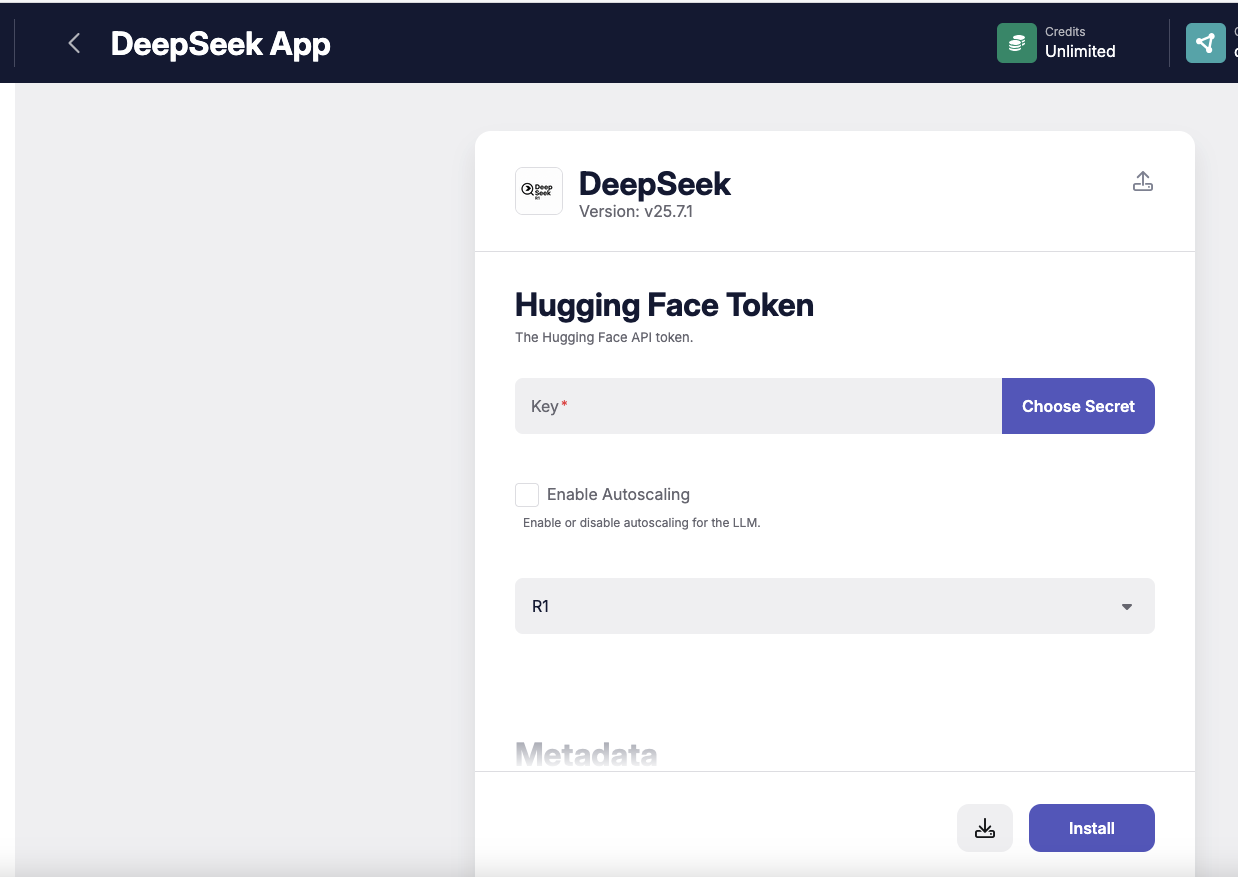
You can deploy DeepSeek on the Apolo platform using the **DeepSeek** app. Apolo automates resource allocation, persistent storage, ingress setup, GPU detection, and environment variable injection—allowing you to focus entirely on model selection and configuration.
**Highlights of the Apolo Installation Flow**:
1. **Integration with Hugging Face**: You can pass your Hugging Face token via an environment variable to pull private models.
2. **Preset Auto-Configuration**: Preset will be chosen by default, according to HuggingFace model minimal vRAM requirements.
3. **Ingress Setup**: By default will be enabled without authentication.
4. **Autoscaling**: Apolo provides built-in support for horizontal pod autoscaling of DeepSeek deployments based on incoming request load. Parameters for autoscaling (min replicas - 1, max replicas - 5, 100 requests per second to start scaling)
5. **Cache**: The caching of your model is enabled by default, the storage path is
```
storage://{cluster_name}/{org_name}/{project_name}/llm_bundles
```
***
## Apolo Deployment
| **Hugging Face Token** | **Required**. Provide a Hugging Face token if model is gated. |
| ---------------------- | ------------------------------------------------------------- |
| **Model** | **Required**. Select model size from the dropdown. |
***
### Web Console UI
Step1 - Select [HuggingFace](https://huggingface.co/) token
Step2 - Choose the size of your model
If Model is [gated](https://huggingface.co/docs/hub/en/models-gated), please make sure that your HuggingFace token has an access to it.
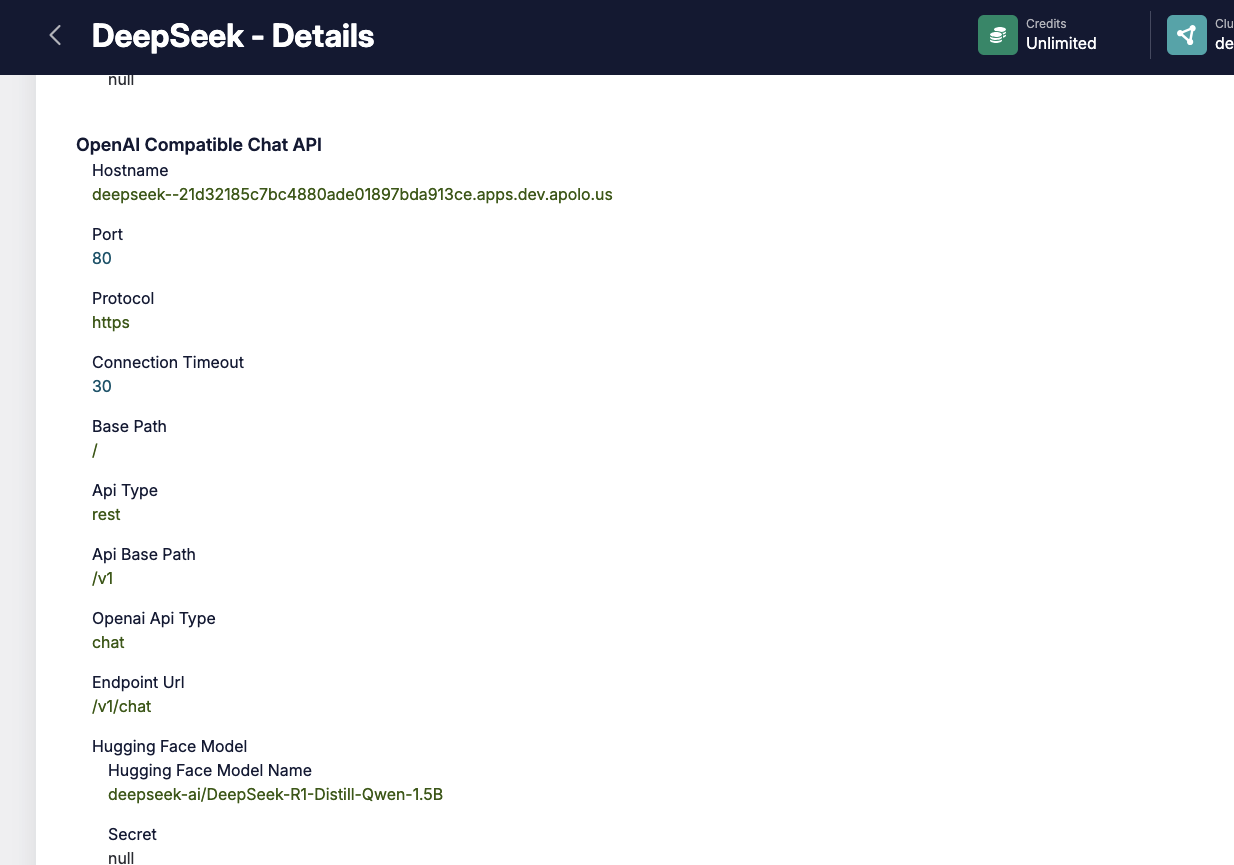
Step 3 - Install and wait for the application to be deployed. Once installed, you can find the API endpoint URL in the Outputs section of the app details page.
### Autoscaling
If you Enable the autoscaling, the following parameters will be applied:
**Default Autoscaling Configuration:**
* **Trigger Threshold**: 100 requests per second
* **Replica Range**: Minimum 1, Maximum 5 replicas
* **Behavior**: The system monitors request volume and automatically adjusts the number of running replicas to match current demand, ensuring efficient use of GPU resources while maintaining performance.
### Usage
```python
import requests
API_URL = "/v1/chat/completions"
headers = {
"Content-Type": "application/json",
}
data = {
"model": "deepseek-ai/DeepSeek-R1-Distill-Qwen-1.5B", # Must match the model name loaded by vLLM
"messages": [
{
"role": "system",
"content": "You are a helpful assistant that gives concise and clear answers.",
},
{
"role": "user",
"content": (
"I'm preparing a presentation for non-technical stakeholders "
"about the benefits and limitations of using large language models in our customer support workflows. "
"Can you help me outline the key points I should include, with clear, jargon-free explanations and practical examples?"
),
},
]
}
if __name__ == '__main__':
response = requests.post(API_URL, headers=headers, json=data)
response.raise_for_status()
reply = response.text
status_code = response.status_code
print("Assistant:", reply)
print("Status Code:", status_code)
```
### References
* [vLLM Official GitHub Repo](https://github.com/vllm-project/vllm)
* [DeepSeek R1 official page](https://deepseek-r1.com/)
* [vLLM application Helm Chart Repository](https://github.com/neuro-inc/app-llm-inference)
* [Apolo Documentation](https://docs.apolo.us/apolo-cli/commands/shortcuts#usage-16) (for the usage of `apolo run` and resource presets)
* [Hugging Face Model Hub](https://huggingface.co/) (for discovering or hosting models)
* [Apolo Hugging Face application management](/index/apolo-console/apps/installable-apps/available-apps/hugging-face.md)
* [vLLM inference install via CLI](/index/apolo-concepts-cli/apps/installable-apps/available-apps/vllm-inference.md)
* [DeepSeek HuggingFace collection](https://huggingface.co/deepseek-ai/DeepSeek-R1)
* [Managing Apps](/index/apolo-console/apps/installable-apps/managing-apps.md)