> For the complete documentation index, see [llms.txt](https://docs.apolo.us/index/llms.txt). Markdown versions of documentation pages are available by appending `.md` to page URLs; this page is available as [Markdown](https://docs.apolo.us/index/apolo-console/apps/installable-apps/available-apps/stable-diffusion.md).
# Stable Diffusion
Stable Diffusion is a state-of-the-art deep learning model designed for generating high-quality images from textual descriptions. It utilizes a **latent diffusion process**, a type of generative model that iteratively refines noise to produce detailed and realistic images. This model is highly efficient, scalable, and capable of running on consumer-grade hardware, making it widely used for applications in art generation, content creation, and research. Developed with open accessibility in mind, Stable Diffusion empowers developers and creators to explore generative AI while maintaining adaptability for various use cases.
Apolo uses [SD.Next](https://github.com/neuro-inc/sdnext)[ ](https://github.com/Stability-AI/StableStudio)as the WebUI for the Stable Diffusion application.
SD.Next is a browser-based interface designed for generating and managing AI-generated images using Stable Diffusion and other models. It offers several customization options, advanced image settings, and integrations for various Stable Diffusion models, enabling users to create and edit images with ease. It also provides an [API](https://github.com/AUTOMATIC1111/stable-diffusion-webui/wiki/API) for generating images which can be integrated into other applications.
## Key Features
| Feature | How the Apolo App Helps |
| ---------------------------------- | ---------------------------------------------------------------------------------------------------- |
| **Text‑to‑Image & Image‑to‑Image** | Prompt → image or edit existing images via Web UI or REST. |
| **Custom Models** | Point to any Stable Diffusion Hugging Face model. |
| **GPU Presets** |
Pick from available Nvidia GPU-enabled resource presets.
Apolo sets env vars & drivers.
|
| **Secrets Integration** | Store HF tokens in Apolo Secrets instead of plain text. |
| **Scalable Replicas** | `replica_count` lets you handle bursty image queues. |
## Installing
Stable Diffusion can be installed on Apolo either via the [CLI](/index/apolo-concepts-cli/apps/installable-apps/available-apps/stable-diffusion.md) or the Apolo Console. Below are the detailed instructions for installing Stable Diffusion using Apolo Console.
### Installing via Apolo Console
#### 1 · Open the catalogue
\
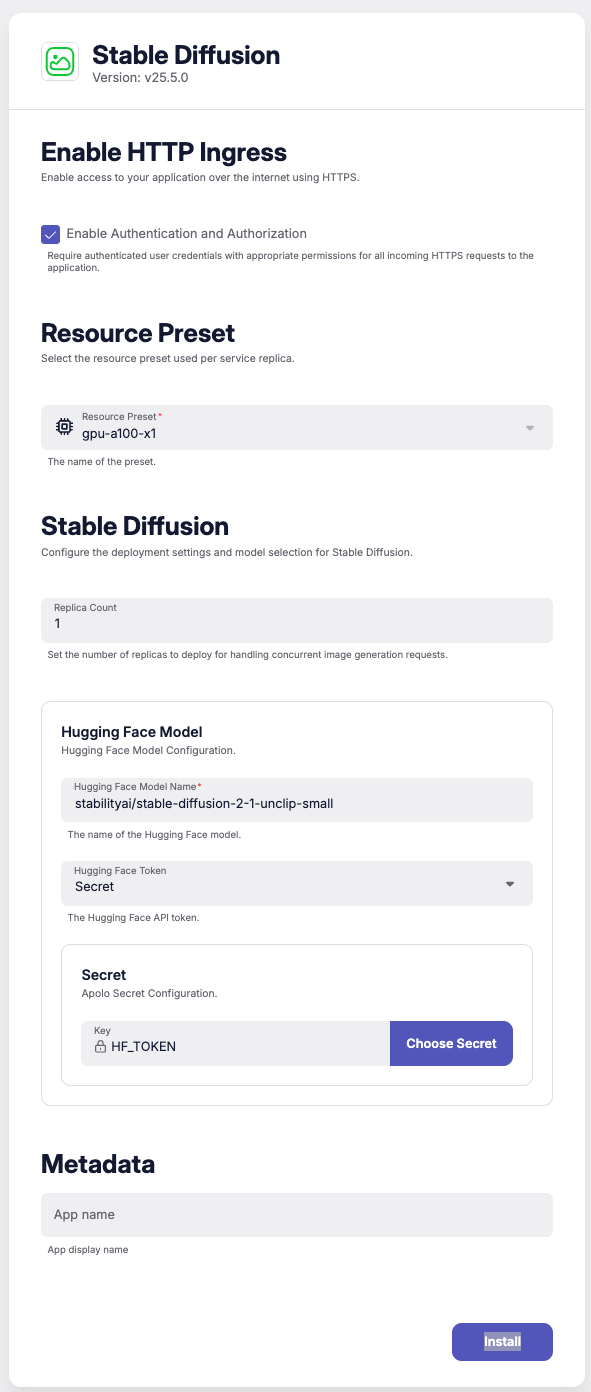
2 · Configure the wizard
| Section | Example | Notes |
| ----------------------- | ----------------------------------------- | --------------------------------------------------- |
| **Enable HTTP Ingress** | `auth = true` | Adds basic‑auth to the public URL. |
| **Resource Preset** | `gpu-a100-x1` | 1× NVIDIA A100 80 GB (or choose `gpu-l4-x1`, etc.). |
| **Stable Diffusion** | `replica_count = 1` | Increase for concurrent jobs. |
| **Hugging Face Model** | `NousResearch/Hermes-3-Llama-3.1-8B-GGUF` | Any HF repo path. |
| **HF Token** | Secret `HF_TOKEN` | Needed for private or gated models. |
Click **Install**. Wait until *Status → healthy*; copy the **external\_api** host (REST) or open the Web UI at `https://sd-.apps..apolo.us`.
### Usage
After installation, you can utilize Stable Diffusion for image generation workflows and you can access it directly from your browser or using its Rest API
To view and manage installed instances of the Stable Diffusion app:
1. Go to the **Installed Apps** tab.
2. You will see a list of all running apps, including the **Stable Diffusion** app you just installed. To open the detailed information & uninstall the app, click the **Details** button.
Once in the Details page, click the **Open App** button at the top of the page to launch the application in a dedicated browser window.
#### 1 · REST API
Once the app is **healthy** Apolo exposes auto‑generated **Swagger** docs at:
```
https:///docs
```
**txt2img endpoint**