> For the complete documentation index, see [llms.txt](https://docs.apolo.us/index/llms.txt). Markdown versions of documentation pages are available by appending `.md` to page URLs; this page is available as [Markdown](https://docs.apolo.us/index/apolo-console/apps/installable-apps/available-apps/weaviate.md).
# Weaviate
**Weaviate** is a robust, open-source vector database that allows you to store and query data based on its meaning. It supports various modules for text, image, and multimodal vectorization, enabling semantic search, advanced filtering, and question-answering. Weaviate offers flexible deployment options and integrates seamlessly with popular machine learning models and frameworks, providing **GraphQL**, and **REST** for easy integration with your applications.
The Apolo **Weaviate App** delivers a fully‑managed cluster with:
* REST, GraphQL & gRPC APIs
* Persistent volume for data
* Optional S3 backups
* One‑click HTTPS ingress secured by basic‑auth
## Key Features
| Feature | How the Apolo App Helps |
| ---------------------- | -------------------------------------------------------------------------------------- |
| **Semantic Search** | Query with `nearVector`, `nearText`, hybrid BM25‑+‑vector, etc. |
| **Multimodal Support** | Bring your own embeddings for text, images, audio or mix. |
| **Modular Pipeline** | Add vectorizers & rerankers outside the DB; Apolo bundles everything in one namespace. |
| **Horizontal Scaling** | Change the *Resource Preset* and restart—no manual sharding. |
| **Secure Ingress** | Auto‑issued TLS cert + platform basic‑auth. |
| **Automated Backups** | Nightly snapshots to an Apolo Files bucket (toggleable). |
The Apolo Platform ships a one‑click *Weaviate App* that encapsulates Helm deployment, persistent storage, ingress and (optionally) automatic backups.
## Installing
Below are the detailed instructions for installing Service Deployment using Apolo Console. For instructions on how to install it using Apolo CLI, visit [Apolo CLI Service Deployment](/index/apolo-concepts-cli/apps/installable-apps/available-apps/service-deployment.md).
### Installing via Apolo Console
#### 1 · Open the catalogue
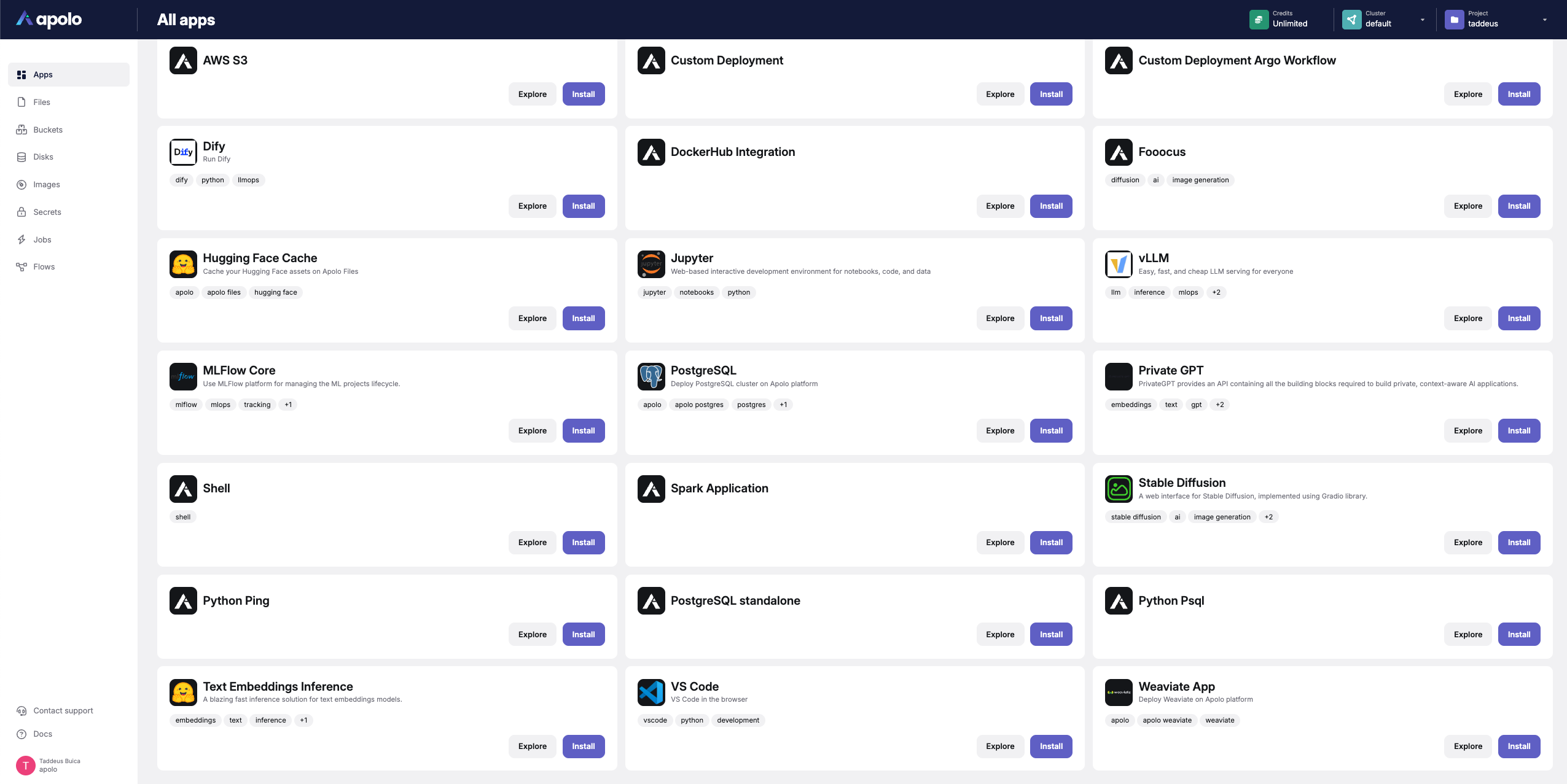
Navigate to **Apps ▸ All apps** and locate **Weaviate App**.
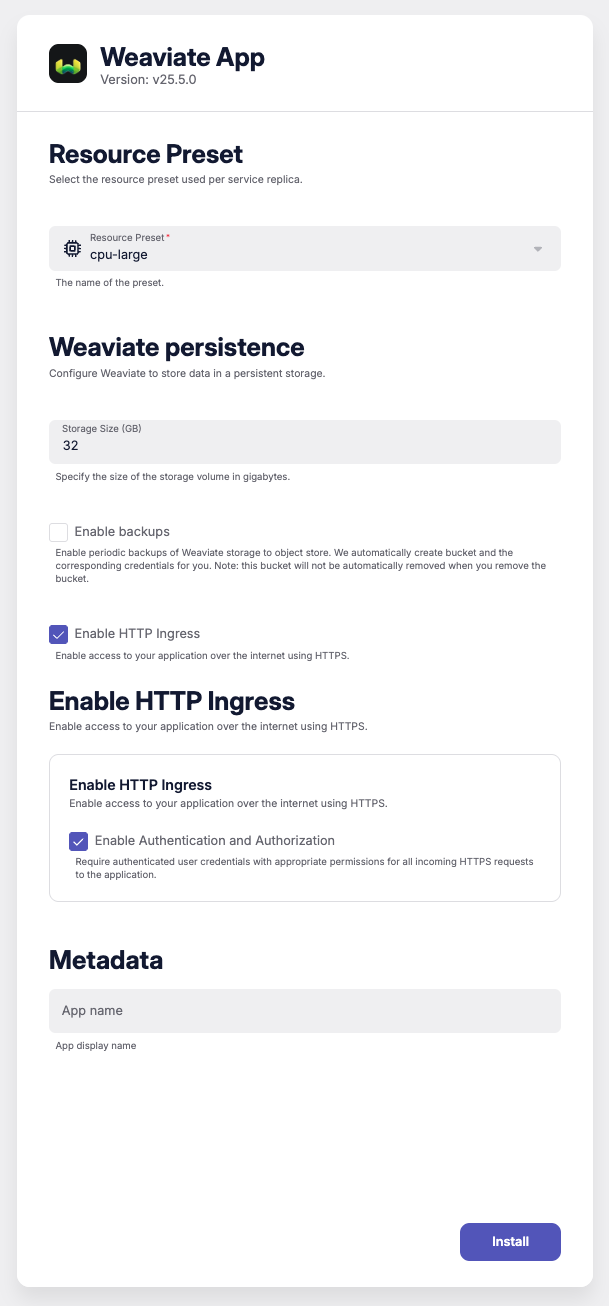
#### 2 · Fill the wizard
| Section | Field | Example | Notes |
| ----------------------- | --------------- | ------------------------------------------------------ | ----------------- |
| **Resource Preset** | `cpu-large` | 4 vCPU / 8 GiB | Adjust as needed. |
| **Persistent Storage** | `size = 32` GiB | PVC for data & WAL. | |
| **Enable Backups** | `true` | Creates `storage:weaviate-backups` bucket. | |
| **Enable HTTP Ingress** | `auth = true` | Makes `https://weaviate-.apps..apolo.us`. | |
Click **Install**. In *Details* your **external endpoints** (REST & GraphQL), basic‑auth creds and namespace appear once status is **healthy**.
### Apolo CLI
Deploy the same config via YAML.
```yaml
# 1. weaviate.yaml
template_name: "weaviate"
template_version: "apolo"
input:
preset:
name: "cpu-small"
persistence:
size: 64 # GiB PVC
enable_backups: true
ingress_http:
auth: false # public (no basic‑auth)
# 2. install it
apolo app install -f weaviate.yaml \
--cluster --org --project
```
**Explanation**
* `preset.name` — picks CPU/RAM preset.
* `persistence.size` — volume size; backups on by default.
* `ingress_http.auth=false` — exposes endpoints openly; set `true` for private mode.
***
### Inputs / Outputs *(schema v1)*
**Inputs**
JSON Path
Default
Description
preset.name
–
Resource preset per replica.
persistence.size
32
Volume size (GiB).
persistence.enable_backups
true
Nightly S3 snapshots.
ingress_http.auth
true
Require basic‑auth.
**Outputs**
| Key | Purpose |
| --------------------------------- | ------------------------------- |
| `external_graphql_endpoint.*` | Public `/v1/graphql` endpoint. |
| `external_rest_endpoint.*` | Public `/v1` REST endpoint. |
| `internal_graphql_endpoint.*` | Private `/v1/graphql` endpoint. |
| `internal_rest_endpoint.*` | Private `/v1` REST endpoint. |
| `internal_grpc_endpoint.*` | Private gRPC in‑cluster. |
| `auth.username` / `auth.password` | Basic‑auth creds (if enabled). |
***
### Usage
Quick connectivity test & schema bootstrap:
```python
import weaviate
client = weaviate.Client(
url="https://apolo‑taddeus‑weaviate-0aad31aa.apps.apolo.us",
additional_headers={"Authorization": "Basic "}
)
assert client.is_ready(), "Weaviate not ready"
print("Connected!")
```
#### **Example Python Scripts**
This example demonstrates connecting to **Weaviate**, defining a schema, embedding documents using the **NV-Embed-v2** model, storing them in Weaviate, and performing a similarity search.
```python
import torch
import torch.nn.functional as F
from transformers import AutoTokenizer, AutoModel
import weaviate
# Step 1: Connect to Weaviate
client = weaviate.Client(
url="",
additional_headers={
"Authorization": "Bearer "
}
)
if client.is_ready():
print("Connected to Weaviate!")
else:
print("Weaviate is not ready.")
exit(1)
# Step 2: Define a schema class in Weaviate
schema_class = {
"class": "Document",
"description": "A collection of documents for testing embeddings",
"vectorizer": "none", # We will provide our own vectors
"properties": [
{
"name": "title",
"description": "Title of the document",
"dataType": ["text"],
},
{
"name": "content",
"description": "Content of the document",
"dataType": ["text"],
},
],
}
# Check if the class already exists
existing_classes = client.schema.get()['classes']
class_names = [c['class'] for c in existing_classes]
if "Document" not in class_names:
client.schema.create_class(schema_class)
print("Schema 'Document' created.")
else:
print("Schema 'Document' already exists.")
# Step 3: Load NV-Embed-v2 model
model_name = "nvidia/NV-Embed-v2"
print("Loading NV-Embed-v2 model...")
model = AutoModel.from_pretrained(model_name, trust_remote_code=True)
tokenizer = AutoTokenizer.from_pretrained(model_name, trust_remote_code=True)
print("Model loaded.")
# Step 4: Prepare a dataset
documents = [
{
"title": "The Impact of Climate Change",
"content": "Climate change affects weather patterns, sea levels, and ecosystems."
},
{
"title": "Artificial Intelligence in Healthcare",
"content": "AI is revolutionizing diagnostics and treatment plans in healthcare."
},
{
"title": "Advancements in Quantum Computing",
"content": "Quantum computers use quantum bits to perform complex calculations."
},
{
"title": "Renewable Energy Sources",
"content": "Solar and wind energy are key to reducing carbon emissions."
},
{
"title": "The Basics of Machine Learning",
"content": "Machine learning enables computers to learn from data."
},
{
"title": "Ocean Conservation Efforts",
"content": "Protecting marine life is essential for ecological balance."
},
{
"title": "Blockchain Technology Explained",
"content": "Blockchain provides a decentralized ledger for transactions."
},
{
"title": "The Human Immune System",
"content": "The immune system defends the body against infections."
},
{
"title": "Exploring the Solar System",
"content": "Mars rovers are providing new insights about the red planet."
},
{
"title": "History of the Internet",
"content": "The internet has transformed communication and information sharing."
},
]
# Step 5: Generate embeddings for the documents
def generate_embeddings(texts, prefix=""):
max_length = 32768 # Adjust as needed
inputs = [prefix + text + tokenizer.eos_token for text in texts]
with torch.no_grad():
embeddings = model.encode(inputs, instruction=prefix, max_length=max_length)
embeddings = F.normalize(embeddings, p=2, dim=1)
return embeddings
# Since we are encoding documents, no instruction prefix is needed
print("Generating embeddings for documents...")
doc_texts = [doc["content"] for doc in documents]
doc_embeddings = generate_embeddings(doc_texts)
print("Document embeddings generated.")
# Step 6: Store documents and embeddings in Weaviate
print("Adding documents to Weaviate...")
for doc, embedding in zip(documents, doc_embeddings):
# Convert the embedding tensor to a list
embedding_list = embedding.tolist()
# Add the document to Weaviate with the vector
client.data_object.create(
data_object=doc,
class_name="Document",
vector=embedding_list
)
print("Documents added to Weaviate.")
# Step 7: Perform a similarity search
query_text = "How does renewable energy help combat climate change?"
query_prefix = "Instruct: Given a question, retrieve passages that answer the question\nQuery: "
print("Generating embedding for the query...")
query_embedding = generate_embeddings([query_text], prefix=query_prefix)[0]
query_embedding_list = query_embedding.tolist()
print("Query embedding generated.")
print("Performing similarity search in Weaviate...")
# Use the 'nearVector' filter to find similar documents
result = (
client.query
.get("Document", ["title", "content"])
.with_near_vector({"vector": query_embedding_list})
.with_limit(3)
.do()
)
print("Search results:")
for idx, res in enumerate(result["data"]["Get"]["Document"], start=1):
title = res.get("title", "No Title")
content = res.get("content", "No Content")
print(f"\nResult {idx}:")
print(f"Title: {title}")
print(f"Content: {content}")
```
This script demonstrates connecting to **Weaviate**, defining a schema, embedding documents using **OpenAI embeddings**, storing them in Weaviate via **LlamaIndex**, and performing a similarity search.\\
```python
import os
from llama_index.core import (
VectorStoreIndex,
Document,
StorageContext,
ServiceContext
)
from llama_index.vector_stores.weaviate import WeaviateVectorStore
from llama_index.embeddings.openai import OpenAIEmbedding
import weaviate
import openai
os.environ["OPENAI_API_KEY"] = ""
# Step 1: Set OpenAI API key
openai.api_key = os.environ.get("OPENAI_API_KEY")
if not openai.api_key:
print("Please set the OPENAI_API_KEY environment variable.")
exit(1)
# Step 2: Connect to Weaviate using the v3 client
weaviate_url = ""
client = weaviate.Client(url=weaviate_url, additional_headers={
"Authorization": "Bearer "
})
if client.is_ready():
print("Connected to Weaviate!")
else:
print("Failed to connect to Weaviate!")
exit(1)
# Step 3: Define schema class in Weaviate
COLLECTION_NAME = "LlamaDocument" # Using capital letter as required
schema = {
"class": COLLECTION_NAME,
"description": "A collection of documents for testing embeddings",
"vectorizer": "none", # We will provide our own vectors via OpenAI
"properties": [
{
"name": "title",
"dataType": ["text"],
"description": "Title of the document",
},
{
"name": "content",
"dataType": ["text"],
"description": "Content of the document",
},
]
}
# Check if the class already exists
existing_classes = client.schema.get()['classes']
class_names = [c['class'] for c in existing_classes]
if COLLECTION_NAME not in class_names:
client.schema.create_class(schema)
print(f"Schema '{COLLECTION_NAME}' created.")
else:
print(f"Schema '{COLLECTION_NAME}' already exists.")
# Step 3.1: Monkey-Patch the class_schema_exists Function
# This is necessary because llama_index's WeaviateVectorStore uses a v3 method that doesn't exist in v4
from llama_index.vector_stores.weaviate.utils import class_schema_exists
import llama_index.vector_stores.weaviate.utils as weav_utils
def new_class_schema_exists(client, class_name):
return client.schema.contains(class_name)
weav_utils.class_schema_exists = new_class_schema_exists
# Step 4: Prepare the dataset
documents = [
{
"title": "The Impact of Climate Change",
"content": "Climate change affects weather patterns, sea levels, and ecosystems."
},
{
"title": "Artificial Intelligence in Healthcare",
"content": "AI is revolutionizing diagnostics and treatment plans in healthcare."
},
{
"title": "Advancements in Quantum Computing",
"content": "Quantum computers use quantum bits to perform complex calculations."
},
{
"title": "Renewable Energy Sources",
"content": "Solar and wind energy are key to reducing carbon emissions."
},
{
"title": "The Basics of Machine Learning",
"content": "Machine learning enables computers to learn from data."
},
{
"title": "Ocean Conservation Efforts",
"content": "Protecting marine life is essential for ecological balance."
},
{
"title": "Blockchain Technology Explained",
"content": "Blockchain provides a decentralized ledger for transactions."
},
{
"title": "The Human Immune System",
"content": "The immune system defends the body against infections."
},
{
"title": "Exploring the Solar System",
"content": "Mars rovers are providing new insights about the red planet."
},
{
"title": "History of the Internet",
"content": "The internet has transformed communication and information sharing."
},
{
"title": "The Evolution of Space Exploration",
"content": "Human missions to Mars and beyond are shaping the future of space exploration."
},
{
"title": "The Role of Genetics in Medicine",
"content": "Genetic research is unlocking personalized treatments and therapies."
},
{
"title": "Cybersecurity in the Digital Age",
"content": "Protecting sensitive data is critical as cyber threats evolve."
},
{
"title": "The Importance of Mental Health Awareness",
"content": "Raising awareness about mental health promotes early intervention and support."
},
{
"title": "Breakthroughs in Renewable Energy Storage",
"content": "Innovative batteries are making renewable energy more reliable."
},
{
"title": "Exploring the Deep Ocean",
"content": "Underwater exploration reveals new species and ecosystems."
},
{
"title": "The Science of Sleep",
"content": "Understanding sleep cycles is key to improving health and productivity."
},
{
"title": "The Future of Urban Transportation",
"content": "Electric vehicles and smart infrastructure are transforming city transit."
},
{
"title": "The Ethics of Artificial Intelligence",
"content": "AI raises important questions about privacy, fairness, and accountability."
},
{
"title": "The Rise of Virtual Reality",
"content": "VR is revolutionizing gaming, training, and immersive experiences."
},
{
"title": "The Power of Microorganisms",
"content": "Microbes play a crucial role in agriculture, medicine, and industry."
},
{
"title": "The History of Renewable Energy",
"content": "From windmills to solar panels, renewable energy has evolved significantly."
},
{
"title": "Exploring the Arctic",
"content": "The Arctic holds clues to understanding climate change and global ecosystems."
},
{
"title": "The Impact of Social Media",
"content": "Social media shapes communication, relationships, and public discourse."
},
{
"title": "The Basics of Cryptocurrency",
"content": "Cryptocurrencies use blockchain technology for secure digital transactions."
},
{
"title": "The Wonders of Human Brain",
"content": "Neuroscience is uncovering how the brain processes information and emotions."
},
{
"title": "Innovations in Agriculture",
"content": "Precision farming and biotechnology are boosting crop yields."
},
{
"title": "Understanding Climate Resilience",
"content": "Building climate-resilient communities is crucial in adapting to change."
},
{
"title": "The Future of Artificial Intelligence",
"content": "Advances in AI are shaping industries and daily life."
},
{
"title": "The Mysteries of Black Holes",
"content": "Black holes challenge our understanding of physics and the universe."
},
{
"title": "The Secrets of Ancient Civilizations",
"content": "Archaeological discoveries reveal insights into ancient cultures and traditions."
},
{
"title": "The Role of Nanotechnology in Medicine",
"content": "Nanotechnology is enabling precise drug delivery and advanced treatments."
},
{
"title": "The Impact of 5G Technology",
"content": "5G networks are transforming communication and powering IoT advancements."
},
{
"title": "Renewable Energy in Urban Planning",
"content": "Cities are integrating solar and wind energy to promote sustainability."
},
{
"title": "The Psychology of Motivation",
"content": "Understanding intrinsic and extrinsic motivation can enhance personal achievement."
},
{
"title": "The Importance of Biodiversity",
"content": "Diverse ecosystems are vital for maintaining balance in nature."
},
{
"title": "The Science of Artificial Photosynthesis",
"content": "Artificial photosynthesis holds potential for renewable energy production."
},
{
"title": "Advances in Autonomous Vehicles",
"content": "Self-driving technology is reshaping transportation and logistics."
},
{
"title": "The History of Electric Cars",
"content": "Electric vehicles have evolved from early prototypes to modern innovations."
},
{
"title": "Exploring Exoplanets",
"content": "Scientists are discovering Earth-like planets in distant solar systems."
},
{
"title": "The Future of Food Technology",
"content": "Lab-grown meat and vertical farming are addressing global food demands."
},
{
"title": "The Importance of Water Conservation",
"content": "Efficient water use is essential to combat scarcity and climate change."
},
{
"title": "The Evolution of Artificial Intelligence",
"content": "AI has progressed from simple algorithms to advanced machine learning."
},
{
"title": "The Physics of Gravitational Waves",
"content": "Gravitational waves provide a new way to observe cosmic events."
},
{
"title": "The Role of STEM Education",
"content": "STEM programs prepare students for careers in science and technology."
},
{
"title": "The Ethics of Genetic Engineering",
"content": "CRISPR technology raises questions about the future of genetic modification."
},
{
"title": "Renewable Energy in Developing Countries",
"content": "Solar and wind projects are transforming energy access in remote areas."
},
{
"title": "The Search for Dark Matter",
"content": "Physicists are investigating the mysterious substance that shapes the universe."
},
{
"title": "The Role of Artificial Intelligence in Finance",
"content": "AI is improving fraud detection, trading strategies, and financial planning."
},
{
"title": "The Impact of Climate Activism",
"content": "Grassroots movements are driving policy changes and awareness on climate issues."
}
]
# Convert to llama_index Documents
documents_list = [
Document(
text=doc["content"],
metadata={"title": doc["title"]}
)
for doc in documents
]
# Step 5: Set up the embedding model
embed_model = OpenAIEmbedding(
model="text-embedding-ada-002",
embed_batch_size=10 # Adjust batch size as needed
)
# Step 6: Set up the vector store using WeaviateVectorStore
vector_store = WeaviateVectorStore(
weaviate_client=client,
index_name=COLLECTION_NAME,
)
# Step 7: Create the storage and service contexts
storage_context = StorageContext.from_defaults(vector_store=vector_store)
service_context = ServiceContext.from_defaults(embed_model=embed_model)
# Step 8: Build the index and add documents to Weaviate
print("Adding documents to Weaviate...")
index = VectorStoreIndex.from_documents(
documents_list,
storage_context=storage_context,
service_context=service_context
)
print("Documents added to Weaviate.")
# Step 9: Perform a similarity search
query_text = "How does renewable energy help combat climate change?"
print("Performing similarity search in Weaviate...")
# Perform the query using the query engine
query_engine = index.as_query_engine(top_k=5)
response = query_engine.query(query_text)
# Print the results
print("\nSearch results:")
print(f"Response: {response}")
print("\nSource documents:")
for idx, node in enumerate(response.source_nodes, start=1):
doc = node.node
title = doc.metadata.get("title", "No Title")
content = doc.get_text()
print(f"\nResult {idx}:")
print(f"Title: {title}")
print(f"Content: {content}")
```
#### **References**
* [Weaviate Official Page](https://weaviate.io/)
* [Weaviate Helm Chart Documentation](https://weaviate.io/developers/weaviate/installation/kubernetes)
* [Weaviate Helm Chart Repository](https://github.com/neuro-inc/weaviate-helm)
* [Weaviate Platform Documentation](https://weaviate.io/developers/weaviate)
* [Weaviate Oficial Repository](https://github.com/weaviate/weaviate)